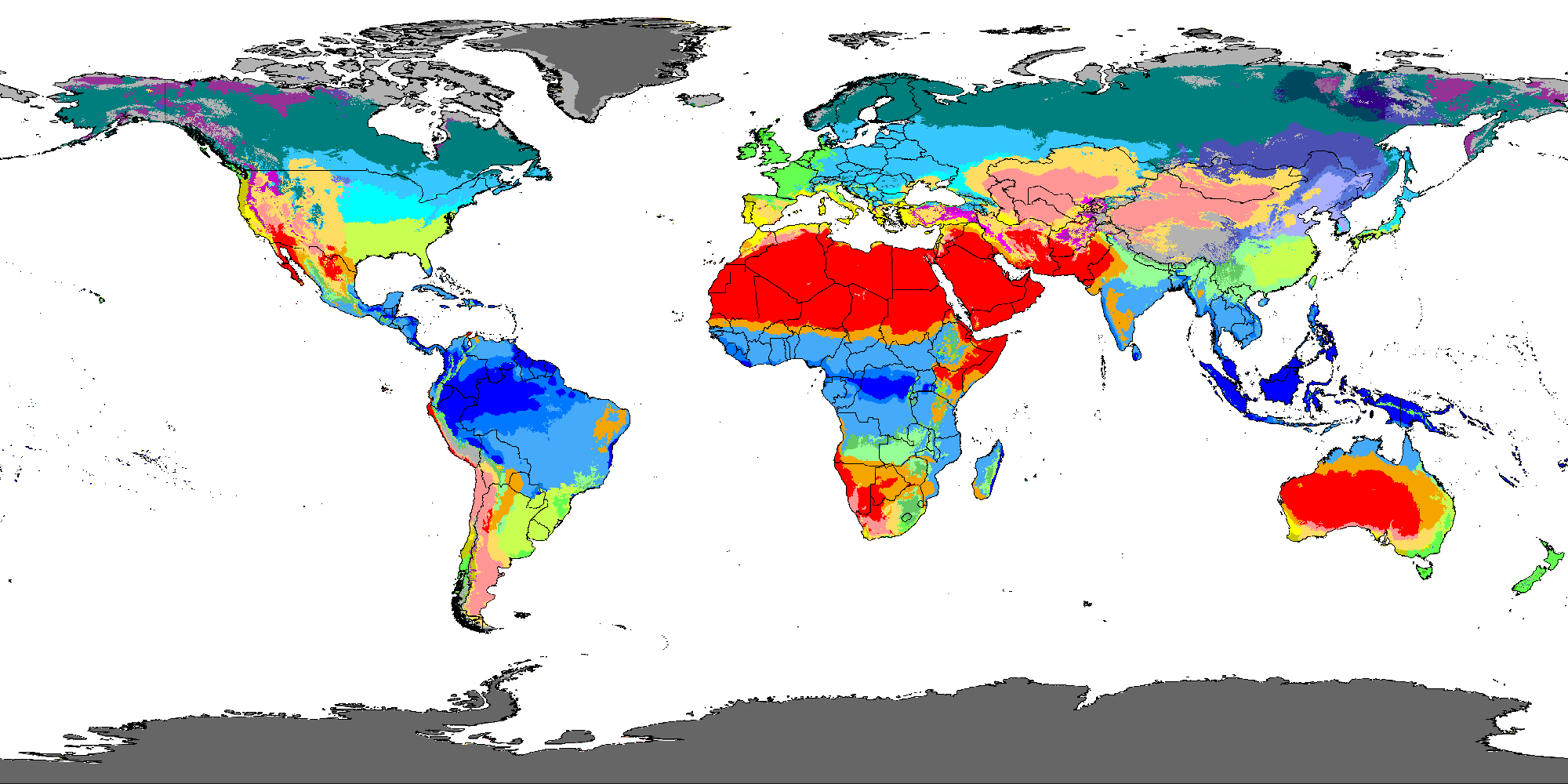
How was this map made?
The climate colors come from the official map image published in Beck, H.E., Zimmermann, N. E., McVicar, T. R., Vergopolan, N., Berg, A., & Wood, E. F., "Present and future Köppen-Geiger climate classification maps at 1-km resolution" (Scientific Data, 2018, CC BY 4.0 license), resized and adapted for the web. Country borders use public-domain data fromNatural Earth.
Each climate code's position was matched by checking the pixel colors of the original map image at around 55 well-known reference locations around the world (the Amazon, the Sahara, Paris, Antarctica, and more). Five rare subtypes that appear only in very small, localized areas such as high mountain ranges (Csc, Cwc, Dsc, Dsd and Dwd) were hard to pin to a reference point, so they are left out of the legend. If you click one of those areas, the tool shows the closest neighboring climate as an approximation. Clicking the map samples the picture's colors rather than looking up a numeric climate record, which is why narrow features and coastlines can be off by a class.
What is the Köppen climate classification?
The Köppen system was devised by the climatologist Wladimir Köppen in the late nineteenth and early twentieth centuries and later refined by Rudolf Geiger and others, which is why modern maps are labeled Köppen-Geiger. It is the most widely used way to sort the world's climates, and it works from temperature and precipitation alone. Climates fall into five main groups (A to E), each with subtypes. A code reads as: first letter = main group, second letter = precipitation pattern, third letter = temperature character. Cfa, for example, means temperate (C), no dry season (f) and a hot summer (a).
The criteria at a glance
The criteria below follow the form commonly used in modern papers such as Peel et al. (2007) and Beck et al. (2018). Details such as the climate period and how edge cases are handled differ between implementations. The symbols are MAT (mean annual temperature), MAP (mean annual precipitation), Thot and Tcold (mean temperature of the hottest and coldest month) and Pdry (rainfall of the driest month).
| Code | Condition | Meaning |
|---|---|---|
| E | Thot < 10°C (ET: 0°C or above, EF: below 0°C) | Polar: even the warmest month stays under 10°C |
| B | MAP < 10 × Pth (BW: below 5 × Pth, otherwise BS); h: MAT ≥ 18°C, k: below | Arid: evaporation outpaces rainfall |
| A | Tcold ≥ 18°C (Af: Pdry ≥ 60 mm, Am: Pdry ≥ 100 − MAP/25, otherwise Aw) | Tropical: warm all year |
| C | Thot above 10°C and Tcold between 0°C and 18°C (0°C exclusive) | Temperate |
| D | Thot above 10°C and Tcold at or below 0°C | Continental |
| Second letter s / w / f (C and D) | s: dry summer, w: dry winter, f: no dry season | Rainfall seasonality |
| Third letter a / b / c / d (C and D) | a: Thot ≥ 22°C, b: four or more months at 10°C or above, c: one to three months, d: Tcold below −38°C | Summer length and winter severity |
Here Pth, the dryness threshold in mm (with MAT in °C), is 2 × MAT if 70% or more of the rain falls in winter, 2 × MAT + 28 if 70% or more falls in summer, and 2 × MAT + 14 otherwise. Older sources and some textbooks put the line between C and D at −3°C rather than 0°C, so the same place can look different from one book to the next. The map on this page comes from Beck et al. (2018), which is consistent with the 0°C reading used here.
Three worked examples with made-up climates
These are invented monthly figures chosen to show the method, not real observations, and the results below were computed by the same function the tool uses. Pick them from the "Load an example" menu above to see the same numbers.
- Made-up city A (summer-heavy rain, cold winter): MAT 13.0°C, MAP 1275 mm, Thot 27°C, Tcold -2°C, Pdry 20 mm, Pth 54.0 → Dwa
- Made-up city B (dry all year, low latitude): MAT 25.3°C, MAP 24 mm, Thot 36°C, Tcold 14°C, Pdry 0 mm, Pth 50.5 → BWh
- Made-up city C (dry summer, wet winter): MAT 18.3°C, MAP 573 mm, Thot 28°C, Tcold 10°C, Pdry 3 mm, Pth 36.5 → Csa
City A has a coldest month at or below 0°C, so it falls in D. Its hottest month is 22°C or higher, giving the final letter a, and its rain is overwhelmingly a summer affair with a dry winter, which gives w. City B receives far less than half of its dryness threshold per year, so it is a hot desert (BW), and an annual mean of 18°C or more adds h. City C has the Mediterranean pattern of dry summers and wet winters, which gives s.
How to read the map and the legend
Click anywhere on the map, or search for a city, and the panel shows the code, a one-paragraph description and a few representative regions. Selecting a legend entry shows the same description without picking a point. A few habits help. Start with the first letter, because it tells you the big picture: warm all year (A), dry (B), mild winters (C), cold winters (D) or polar (E). Then read the second letter for when the rain falls and the third for how hot or long the summer is. Two places with the same first two letters can still feel very different if their third letters differ.
Common misunderstandings and limits
- It describes long-term normals, not one year's weather. Climate values are averages over decades, so a heat wave or drought does not change a place's code.
- A city center and its surroundings can differ. Elevation, coast and mountains change climate over short distances. The map here is a reduced image of a high-resolution grid, so narrow areas may not be accurate.
- The original Köppen scheme and modern implementations differ. Dryness thresholds and the C/D boundary (0°C or −3°C) vary, so a city's code can differ between references.
- Boundaries shift with climate change. Beck et al. (2018) also published future-scenario maps, but this page uses only the present-day map.
- This tool's data has limits. The legend omits the five rare subtypes mentioned above, clicking returns the nearest palette color rather than a measured value, and the city list is a modest set of well-known cities, not a gazetteer.
- The classifier uses only 12 monthly averages. It ignores daily range, snow cover and humidity, it treats the summer half-year as a fixed April-September or October-March window, and it is a simplified implementation, so its answer is only as good as the climate data you enter.
Putting the result to use
To judge a destination's seasons, read the third letter (summer length) together with the second (where the dry season falls). For geography or earth-science study, learning the boundaries such as "A means Tcold ≥ 18°C and E means Thot < 10°C" helps more on exam questions than memorizing example regions. Once you know a place's climate type, World Weather shows what current conditions and the five-day forecast look like there, and the World Time Zone Converter helps with planning a trip across regions.
Frequently Asked Questions
Are the boundaries on the map always exact?
Climate boundaries shift gradually in the real world, and academic sources vary slightly depending on the data and method. This map is based on the widely cited Beck et al. (2018) dataset.
Why are there black lines or gray areas on the map?
The black lines are country borders. Some areas may show no data where observation records are too sparse to classify.
Does the climate classification always match actual vegetation?
The Köppen classification was originally designed around vegetation distribution, so it lines up well with vegetation zones, but human development and unusual terrain create exceptions.
Why does the classifier sometimes disagree with the map?
The map is built from a 1 km grid of observed and adjusted data, while the classifier uses only the 12 monthly values you type. A weather-station figure versus a grid average, or a different averaging period, can flip the code in border areas.
Are the temperatures and rainfall I enter stored?
No. The calculation runs entirely in your browser and nothing is sent to a server or saved. Refreshing the page clears the inputs.
Where does the line between C and D fall?
Modern papers, including the dataset behind this map, put it at a coldest-month mean of 0°C. Some older sources and textbooks use −3°C, which moves some places between the two groups. Check which convention a source uses before comparing codes.